In short
A Make.com scenario that turns a Google Sheet of product ideas into ready-to-list products. Each row holds an idea, a prompt and an example image. Make sends the example photo and prompt to OpenAI's image model to generate a new product image, saves it to Google Drive and writes the link and date back to the sheet. ChatGPT writes the Etsy listing: title, detailed description, personalisation notes and 13 relevant tags. One sheet drives every product, so a whole collection is produced by filling in rows.
Project description
Selling personalised products on Etsy means producing a photo and a full listing for every variation: one design for chefs, another for plumbers, another for teachers. Done by hand, each one is a design session plus a copywriting session. This Make.com scenario turns the job into filling in a spreadsheet. Each row is a product idea, and the scenario produces the product image and the listing text for it.
Tools & Deliverables
- Google Sheets as the control panel: command, example image, idea, prompt, image link, creation date and description on every row
- Router with three branches, one per command: write the image prompt, generate the image, or write the listing
- Image generation through OpenAI's image API over HTTP, using an example product photo from Google Drive as the reference
- Generated image saved to Google Drive, with the download link and creation date written back to the row
- ChatGPT listing copy for Etsy: product title, detailed description, personalisation notes and 13 relevant tags
- Adaptable to other marketplaces by changing the listing instructions
The problem
- Every variation needs its own photo. A personalised product sold to ten professions needs ten mockups, and each one takes a designer's time.
- Listings take as long as the design. Titles, descriptions and tags written by hand slow down every launch.
- Consistency slips. Product photos made one at a time drift in style, which makes a shop look unplanned.
- Ideas wait in a list. Good product ideas sit in a spreadsheet because producing each one is too much work.
Approach
The spreadsheet stays where the seller works. Each row holds a product idea and a reference image, and a command column says what should happen next. Make watches the sheet, and a router sends each row down the branch that matches its command.
The image branch downloads the example product photo from Google Drive and sends it, with the prompt, to OpenAI's image model through an HTTP request. Because the model works from the reference photo, every new image keeps the same product style, an engraved acrylic night light in the demo, while the design changes to fit the new idea. The response is parsed, the image is saved back to Google Drive, and the row is updated with the download link and the date it was made. The other branches use ChatGPT: one writes a detailed image prompt from the idea, and the other writes the full Etsy listing into the Description column.
Solution
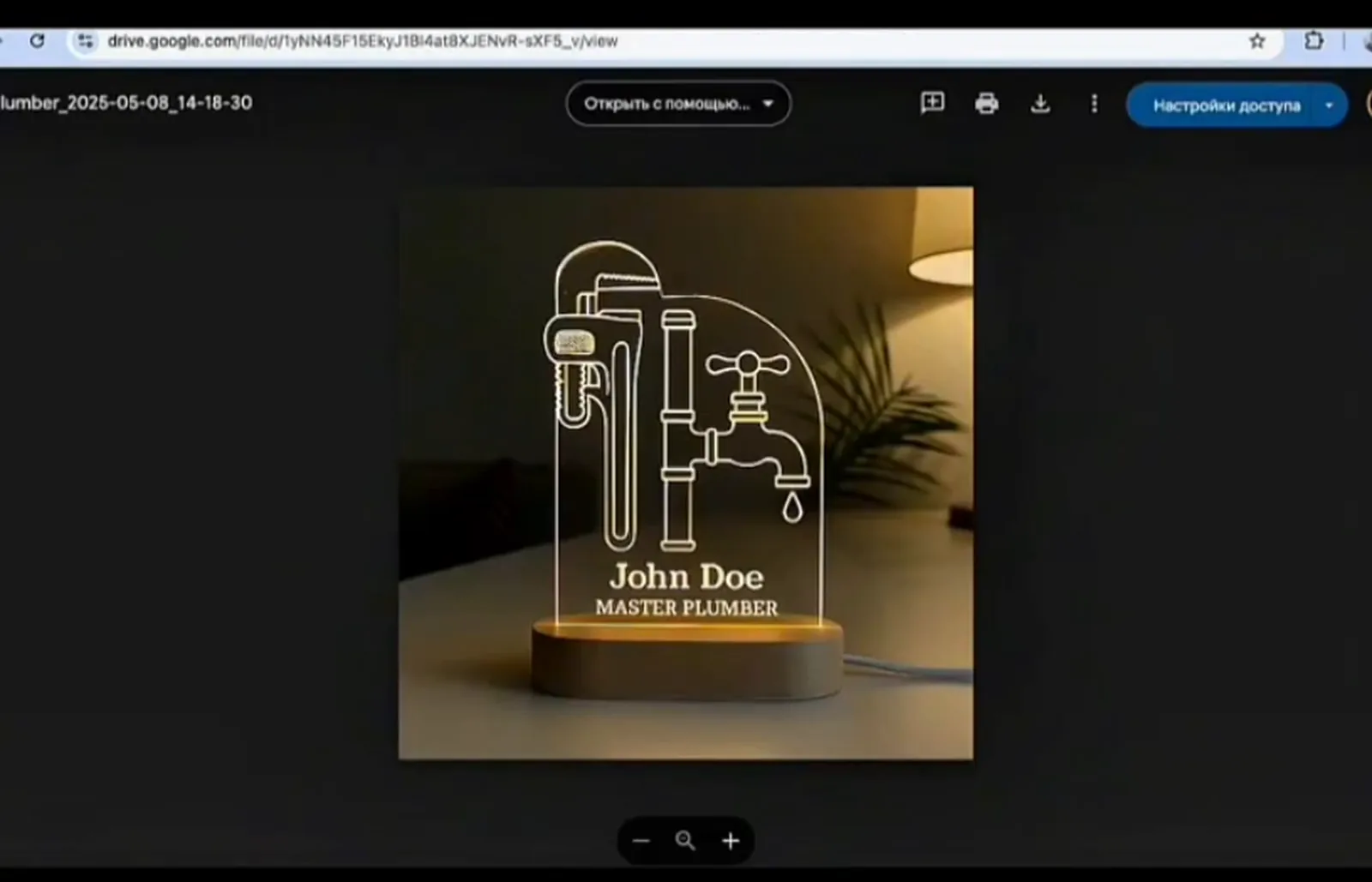
In the demo, the idea "Chef" becomes a photo of an engraved acrylic night light with chef's tools and a name plate, together with a full Etsy listing: title, description, personalisation details and tags. A second idea, "Plumber gift", produces a matching night light with plumbing tools, in the same style. Each one takes a single command in the sheet.
A seller can now line up a whole collection, such as gifts for twenty professions, by adding rows, then review every image and listing in one place before publishing. The same scenario works for Amazon, Shopify or a print-on-demand store by changing the listing instructions, and the image branch can produce mockups for mugs, shirts or posters from a different reference photo.
FAQ
Does it publish to Etsy directly?
Not in this build. Images and listings land in the sheet for review first. Publishing through the Etsy API can be added as a final step.
Why use an example image?
It keeps every product in the same style. The model changes the design to fit the idea, not the product type or the look.
Can I edit the prompts?
Yes. Each row has its own prompt, and the scenario can write one from the idea for you to adjust.
Does it work for other marketplaces?
Yes. Amazon, Shopify and print-on-demand listings only need different listing instructions.
What does each product cost to make?
Roughly one image generation and one text generation on OpenAI, plus a few Make operations. The exact cost depends on the image size and model.