In short
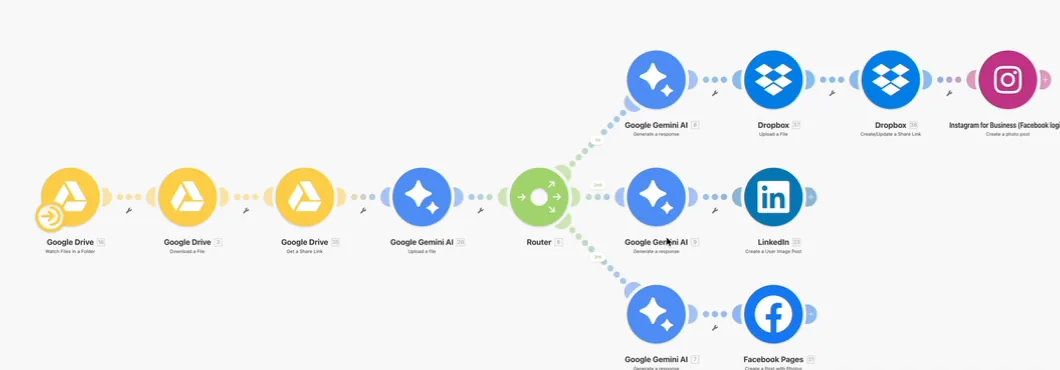
A Make.com scenario that turns one upload into three platform-ready posts. Drop an image or video into a Google Drive folder and the scenario picks it up, Google Gemini writes a separate caption for Instagram, LinkedIn and Facebook, and Make publishes each one to the right account. Instagram will not accept a Google Drive link, so the file is re-hosted on Dropbox first and the Dropbox share link is what Instagram receives. One upload, three posts, each written for the platform it lands on rather than one caption pasted everywhere.
Project description
Posting the same piece of content to three platforms is three separate jobs: three captions, three uploads, three logins. This Make.com scenario collapses that into one action. Content goes into a Google Drive folder, and from there the scenario reads it, writes a caption suited to each platform with Google Gemini, and publishes to Instagram, LinkedIn and a Facebook page on its own.
Tools & Deliverables
- Make.com scenario triggered by a new file in a watched Google Drive folder, handling both images and videos
- Google Gemini reading the media and writing a separate caption for each platform rather than one generic post
- Router splitting the flow into three branches, one per platform, each with its own caption step
- Instagram for Business publishing through a Dropbox share link, because Instagram rejects direct Google Drive links
- LinkedIn image post and Facebook page post with photos, each with its own AI-written copy
- A content pipeline the owner runs by doing one thing: putting a file in a folder
The problem
- Three platforms means three jobs. Every piece of content needed a caption written, a file uploaded and a post published, three times over, which is exactly the kind of repetition that stops a posting schedule being kept.
- One caption does not fit three audiences. A LinkedIn post, an Instagram caption and a Facebook update read differently. Copying the same text everywhere looks lazy on at least two of them.
- Instagram is picky about where media lives. Its API will not take a Google Drive link, so the obvious build fails on the platform that matters most for visual content.
- Posting depends on someone remembering. Content sat in a folder waiting for a free half hour, and the gap between creating it and publishing it kept growing.
Approach
The trigger is the simplest possible action: a new file arriving in a Google Drive folder. Make downloads it and creates a share link, then hands the media to Google Gemini so the caption is written from what is actually in the image or video rather than from a filename. A router then splits the flow into three independent branches, one per platform, and each branch has its own Gemini step with instructions written for that platform's tone and length.
Instagram needed a workaround that most first attempts miss. Its publishing API refuses Google Drive links, so the Instagram branch uploads the file to Dropbox, creates a Dropbox share link, and passes that to Instagram for Business. LinkedIn receives an image post through its own module, and the Facebook branch posts to the page with the photo attached. Because each platform has its own branch, one platform's copy or rules can change without touching the other two.
Solution
Publishing is now a single action: put the file in the folder. The scenario writes three different captions, each matched to its platform, and posts to Instagram, LinkedIn and Facebook without anyone opening those apps. The content calendar stops depending on someone finding a free half hour, and every platform gets copy written for it rather than a pasted duplicate.
The structure is also easy to extend. Adding another platform is another router branch with its own caption step, and changing the tone for one platform means editing that branch's instruction rather than the whole scenario. Swapping Gemini for another model is a module change. The Dropbox step is the only part that exists purely to satisfy a platform rule, and it is isolated in the Instagram branch where it belongs.
FAQ
Why is Dropbox in a Google Drive workflow?
Because Instagram will not publish from a Google Drive link. Re-hosting the file on Dropbox and passing the Dropbox share link is the reliable route, and it only happens in the Instagram branch.
Does every platform get the same caption?
No. Each branch has its own AI step with platform-specific instructions, so LinkedIn gets a professional post, Instagram gets a caption built for its audience, and Facebook gets its own version.
What happens if one platform fails?
Make records the error in the execution history so it can be fixed and re-run. An error handler on each branch lets the other platforms keep publishing when one is down.
Can it schedule posts instead of publishing immediately?
Yes. A scheduling step or a date column in a sheet turns this into a content calendar, and the same branches publish when the date arrives.
Can more platforms be added?
Yes. X, TikTok, Pinterest or a Google Business Profile are each another branch with their own caption step.