In short
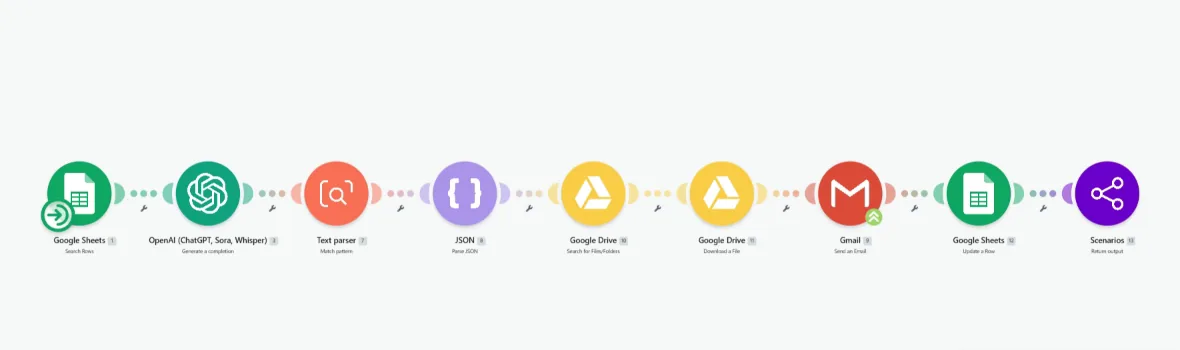
A Make.com outreach system that turns a Google Sheet of leads into personalised emails. For each row, OpenAI writes a message from that lead's own details, the right file is found in Google Drive and attached, Gmail sends it, and the row is updated so nobody is contacted twice. It sends 100+ personalised emails a day and saves over two hours a week of manual outreach, with every email reading like it was written for one person because it was.
Project description
Cold outreach works when it is personal and fails when it is a template with a name swapped in. Doing it properly by hand means reading each lead, writing each email and attaching the right file, which caps how many go out in a day. This Make.com scenario does the reading and writing for every row in a lead sheet, attaches the right document from Google Drive, sends through Gmail, and marks the row as contacted.
Tools & Deliverables
- Make.com scenario that reads each lead row from Google Sheets, including name and the details that make an email personal
- OpenAI writing each email from that lead's details rather than filling a fixed template
- Text parser and JSON parsing to pull a clean subject and body out of the AI response
- Google Drive search and download, so the right attachment goes with each email
- Gmail sending under the sender's own account, with the sheet row updated after each send
- Built to send 100+ personalised emails a day and save over two hours a week
The problem
- Personal outreach does not scale by hand. Reading a lead, writing to them properly and attaching the right file takes minutes per email, so volume and quality fight each other.
- Templates get ignored. A mail merge with a first name inserted reads like a mail merge, and recipients can tell.
- Attachments are where it breaks. Finding the right file for each recipient is the fiddly step that gets skipped or done wrong.
- Tracking falls apart. Without each send recorded against the lead, people get emailed twice or not at all.
Approach
The lead sheet is the source of truth. The scenario searches it for rows that are due, and for each one it passes the lead's details to OpenAI with instructions to write a short email that refers to that person specifically. The response is run through a text parser and a JSON step so the subject line and body come out clean and in a predictable shape, which matters because an AI response that is ninety percent right is still an email that fails to send.
The attachment is handled as its own step rather than assumed. Make searches Google Drive for the file that belongs with that email and downloads it, then Gmail sends the message with the file attached from the sender's own account. The final step updates the row in the sheet, which is what stops a second run contacting the same person again and gives a running record of who was sent what.
Solution
The system sends 100+ personalised emails a day without anyone writing them, and saves over two hours a week that used to go into writing and sending one at a time. Every email is written from that lead's own row, with the right attachment, and every send is recorded back in the sheet.
The structure keeps the parts that need human judgement in human hands. The lead list, the details on each row and the instructions that set the tone of the emails all live where the sender can change them, so changing the offer or the voice is an edit to the prompt rather than to the scenario. The sheet doubles as the outreach log, so it is always clear who has been contacted and when.
FAQ
Is every email actually different?
Yes. Each one is written from that lead's own details by the AI step, so two leads in the same sheet get two different emails.
How does it avoid emailing the same person twice?
The row is updated after each send, so the next run skips anyone already contacted.
Does it send from my own email address?
Yes. Gmail sends under your account, so replies come straight back to your inbox.
Can I review emails before they go out?
Yes. The AI can write into a draft column for approval, and the send step only fires for approved rows.
What about deliverability?
Sending is paced through your own mailbox, and volume can be capped per day. For large campaigns, a dedicated sending tool such as Instantly or Smartlead plugs into the same flow.