In short
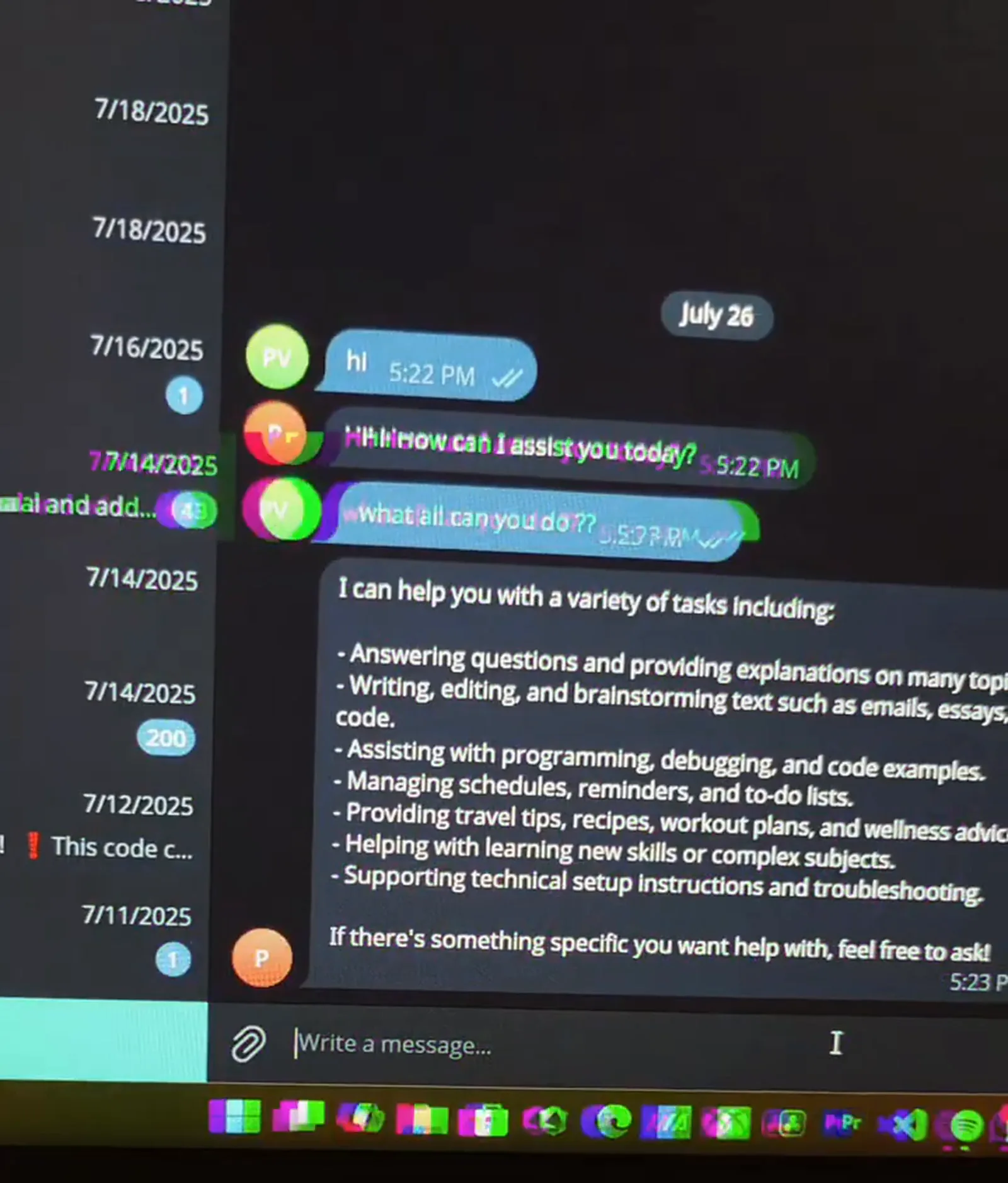
A personal AI assistant that lives in Telegram, built in n8n. Every message is checked as text or voice. Voice messages are downloaded and transcribed with OpenAI, then both kinds go to an AI agent with chat memory, and the answer comes back in the same chat, with a typing indicator while it works. In the demo it explains what it can do, then writes a Python depth-first search on request. The same pattern becomes a team helpdesk, an internal knowledge bot or a client-facing assistant by changing the prompt and adding tools.
Project description
Telegram is where many people already talk all day, which makes it a natural home for an assistant. This n8n workflow turns a Telegram bot into one: it accepts typed or spoken messages, keeps track of the conversation, and answers in the same chat. Voice is treated as a first-class input, so asking out loud while walking works as well as typing at a desk.
Tools & Deliverables
- Telegram trigger on a dedicated bot, plus a typing indicator so the user can see it is working
- Switch node that routes each message as text or voice
- Voice path: file download from Telegram and transcription with OpenAI
- Separate context steps for typed and transcribed input, both feeding one AI agent
- OpenAI chat model with simple memory, so follow-up questions keep their context
- Reply sent back to the same Telegram chat
The problem
- Switching apps breaks focus. Opening a separate AI tool for every quick question adds friction, especially on a phone.
- Typing is not always possible. On the move, a voice message is faster, but most bots ignore audio.
- Bots without memory feel broken. If every message starts from zero, a follow-up like "now do it in Python" makes no sense.
- Silence looks like failure. Without a typing signal, people resend their message while the model is still working.
Approach
The Telegram trigger fires on every message to the bot. Straight away the workflow sends a typing action, so the user sees the bot is working, and a switch node splits the message into text or voice. Text is passed to the agent as it is. For voice, the workflow fetches the file from Telegram and transcribes it with OpenAI, then hands the transcript to the agent through its own context step.
Both paths meet at one AI agent running on an OpenAI chat model with simple memory. Memory is what turns a chatbot into an assistant: it holds the recent conversation, so a follow-up question, or a request to change something it just wrote, works without repeating the background. The answer is sent back to the same chat.
Solution
The result is an assistant that is always one message away. In the demo it greets the user, explains what it can help with, from questions and writing to code, planning and troubleshooting, and then writes a depth-first search in Python on request, with a short explanation of how it works.
The same workflow is a starting point for more specific bots. Swap the prompt and add tools, and it becomes a helpdesk that answers from company documents, a sales assistant that looks things up in the CRM, or an internal bot that files tasks. Access can be limited to approved Telegram users, and the model can be swapped for Claude, Gemini or a local model without touching the rest of the flow.
FAQ
Does it understand voice messages?
Yes. Voice messages are downloaded from Telegram and transcribed with OpenAI before the agent answers.
Does it remember the conversation?
Yes. Simple memory holds the recent chat, so follow-up questions keep their context.
Can it be limited to my team?
Yes. The workflow can check the sender against a list of approved Telegram users before it answers.
Can it use our own documents or tools?
Yes. The agent node accepts tools, such as a knowledge base lookup, Google Sheets, a CRM or a calendar.
Which AI model does it use?
OpenAI in this build. Claude, Gemini or another chat model can replace it in the agent node.