In short
One n8n intake workflow built to be reused across an agency's clients. The nodes never change. Client name, AI vocabulary, escalation threshold, CRM, logging and alert destinations all live in a single config node, so onboarding the next client is an edit rather than a build. Recorded running live: the same pipeline is swapped from a dental clinic to a real estate agency with zero nodes added or connections moved, then deliberately broken to show three retries, a caught error, an alert carrying the client and execution id, and a clean response still returned to the caller.
Project description
An agency selling the same automation to many clients usually ends up with many copies of it. Copy five, change a few values, and within a year there are five workflows that have quietly drifted apart and a bug fix that has to be applied five times. This template is built the other way around: one workflow, and everything client-specific lives in a single config node. Onboarding the next client means editing that node. Nothing is added, nothing is rewired, and the logic stays identical across every client running it.
Tools & Deliverables
- One reusable n8n workflow, 18 functional nodes in six labelled sections, with a config node as the only client-specific surface
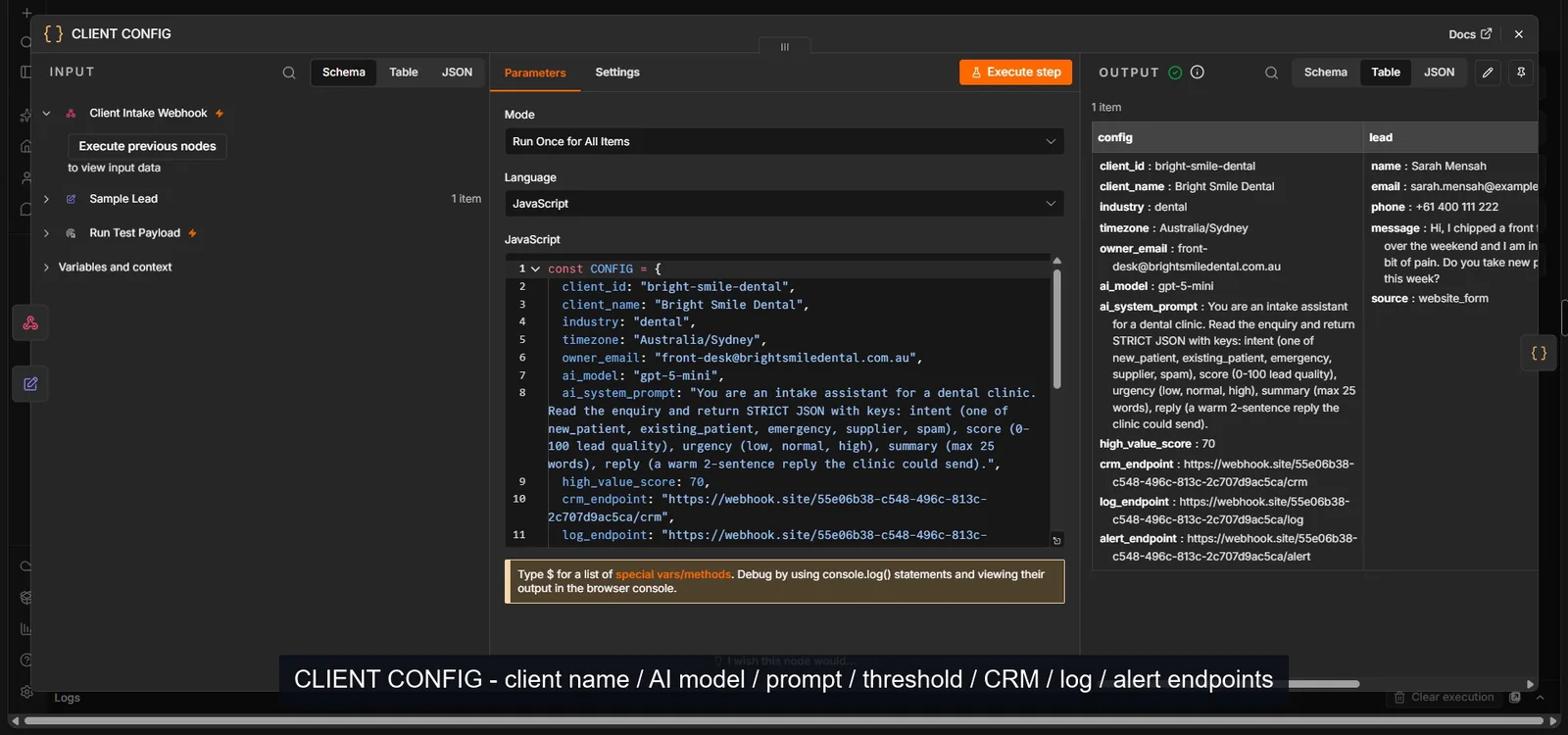
- Client config holding name, industry, timezone, owner email, AI model, AI prompt, escalation threshold and the CRM, logging and alert endpoints
- AI intake step returning strict JSON: intent, lead score out of 100, urgency, a short summary and a two-sentence draft reply
- Branching on the AI's own classification, with the high-value threshold read from config rather than hardcoded
- Two layers of error handling: retries then a caught error path with an alert, plus a workflow-level trigger for runs that die outright
- Audit row written on every run with run id, client, intent, score, status and timestamps, and a test payload trigger to verify a deployment
The problem
- Copy-paste onboarding creates drift. Duplicating a workflow per client feels fast on day one and is expensive by client five, because each copy picks up small edits nobody records.
- A fix then has to be applied everywhere. When a bug surfaces, it exists in every copy, and the ones nobody remembers are the ones that keep failing.
- Client values get scattered through the nodes. An endpoint here, a threshold in an IF node, a prompt inside the AI step. Changing a client's settings becomes a hunt rather than an edit.
- Errors either kill the run or disappear. Without a deliberate failure path, one bad API response takes the whole execution down, and the caller gets nothing with no alert raised.
- Execution status is not health. A handled error still reports the run as successful, so a dashboard full of green ticks can hide a client whose CRM has not received anything in a week.
- Onboarding time caps growth. If taking a new client means a build, the number of clients an agency can take is limited by developer availability rather than by sales.
Approach
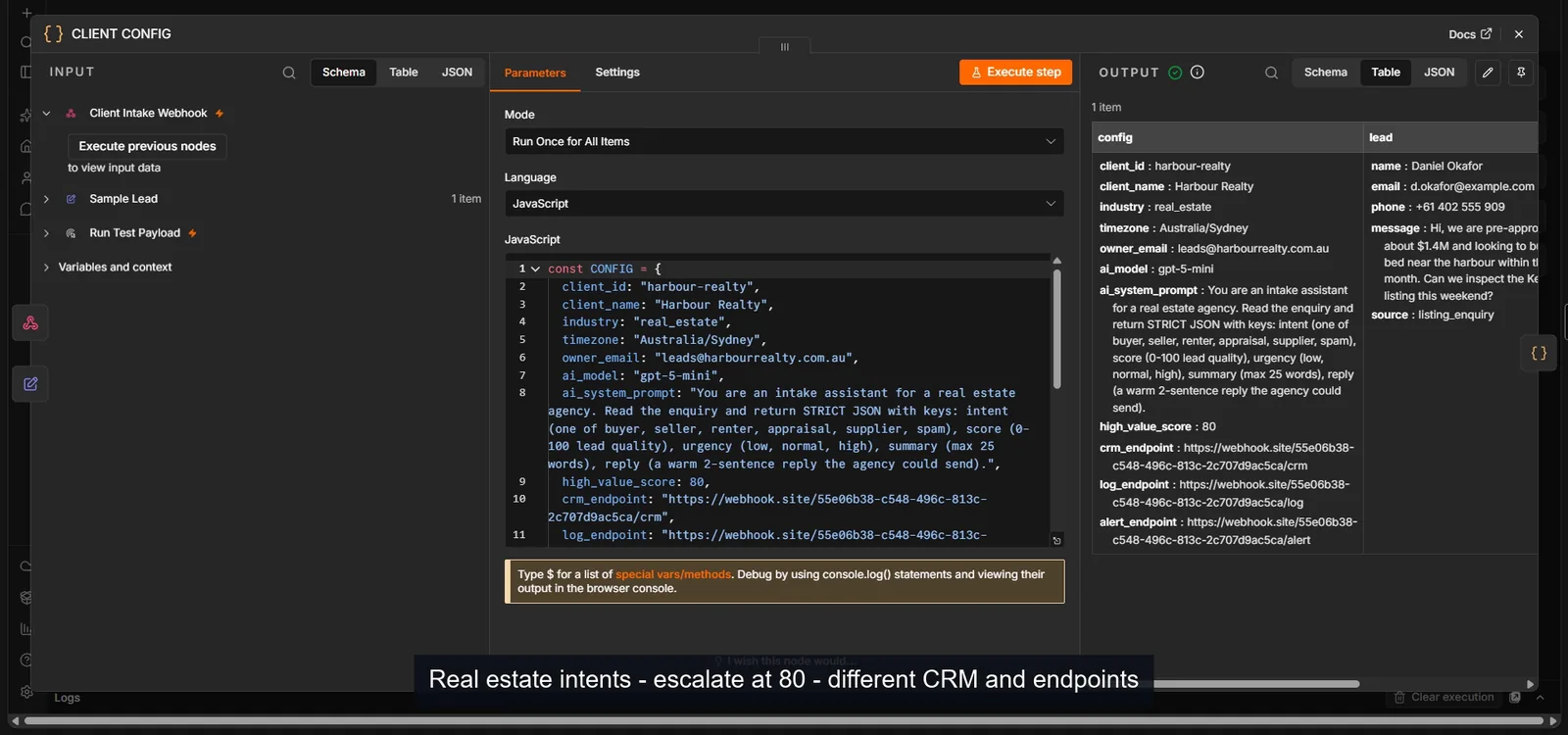
Everything that differs between clients was pushed into one place. The config node holds the client id and name, the industry, the timezone, the owner's email, the AI model, the AI system prompt, the escalation threshold and the three destinations the workflow posts to: CRM, audit log and alerts. Every downstream node reads from there. The AI prompt is config rather than code because the vocabulary is what actually changes per client: a dental clinic classifies enquiries as new patient, existing patient, emergency, supplier or spam, while a real estate agency needs buyer, seller, renter, appraisal, supplier or spam. Same node, different instruction.
The branching reads its threshold from config too, which is what makes the swap genuinely structural rather than cosmetic. One client escalates at 70, another at 80, and no IF node is edited to make that true. Credentials are referenced from n8n's credential store rather than pasted into nodes, so moving the template into a client's own account is a credential swap, not a workflow rewrite.
Error handling is deliberately two separate mechanisms, because caught failures and total failures are different problems. The AI, notify and CRM steps retry three times at two second intervals, and the log step twice. When retries are exhausted the node takes its error output instead of killing the run, an alert goes out carrying the client name, the failing node and the execution id, and the caller still receives a clean response. Underneath that sits a workflow-level error trigger for the failures that kill a run outright, such as an expired credential, which no node-level handler can catch.
Solution
The recorded run proves the claim rather than asserting it. The config is swapped from a dental clinic to a real estate agency: different AI vocabulary, a threshold moving from 70 to 80, different CRM, log and alert destinations. The same pipeline then processes a property enquiry, classifies it as a buyer, scores it, routes it down the high-value branch against the new threshold and delivers all three payloads. Zero nodes added, zero connections moved. That swap is the entire onboarding.
The error path was tested by breaking it on purpose. Pointing the AI step at a model that does not exist produces three retry attempts two seconds apart, then the error output fires, the alert is delivered with the client and execution id attached, and the run completes cleanly rather than collapsing. One finding from that testing is worth stating plainly, because it changes how you monitor these systems: a caught error still reports the execution as successful, since n8n counts a handled failure as a completed run. That is correct behaviour and completely misleading on a dashboard, which is why every run writes its own status into the audit log rather than relying on execution status.
FAQ
How long does onboarding a new client actually take?
As long as it takes to fill in the config: name, industry, the AI prompt vocabulary for that sector, the escalation threshold and three endpoints. The demo does it on camera in under a minute. The real work moves to deciding what the thresholds and vocabulary should be, which is a conversation rather than a build.
What happens when one client genuinely needs a different step?
That is the right moment to branch, not to fork. A client-specific route inside the same workflow keeps one template and one place to fix bugs. Forking into a second copy is a decision to maintain two systems, and it should be taken deliberately rather than by accident.
Where do the credentials live?
In n8n's credential store, referenced by the nodes rather than pasted into them. Moving the template into the client's own n8n account means connecting their credentials, not editing the workflow.
How do you know it is healthy if handled errors report success?
By not trusting execution status. Every run writes an audit row with its own status field, so a week of green executions where the CRM received nothing is visible in the log. That distinction is the single most useful thing in the build.
Can it run on the client's own n8n and their own AI key?
Yes. The model is a config value, so pointing it at a different provider or a cheaper model is one line. The demo runs on a low cost model so it costs nothing to show.