In short
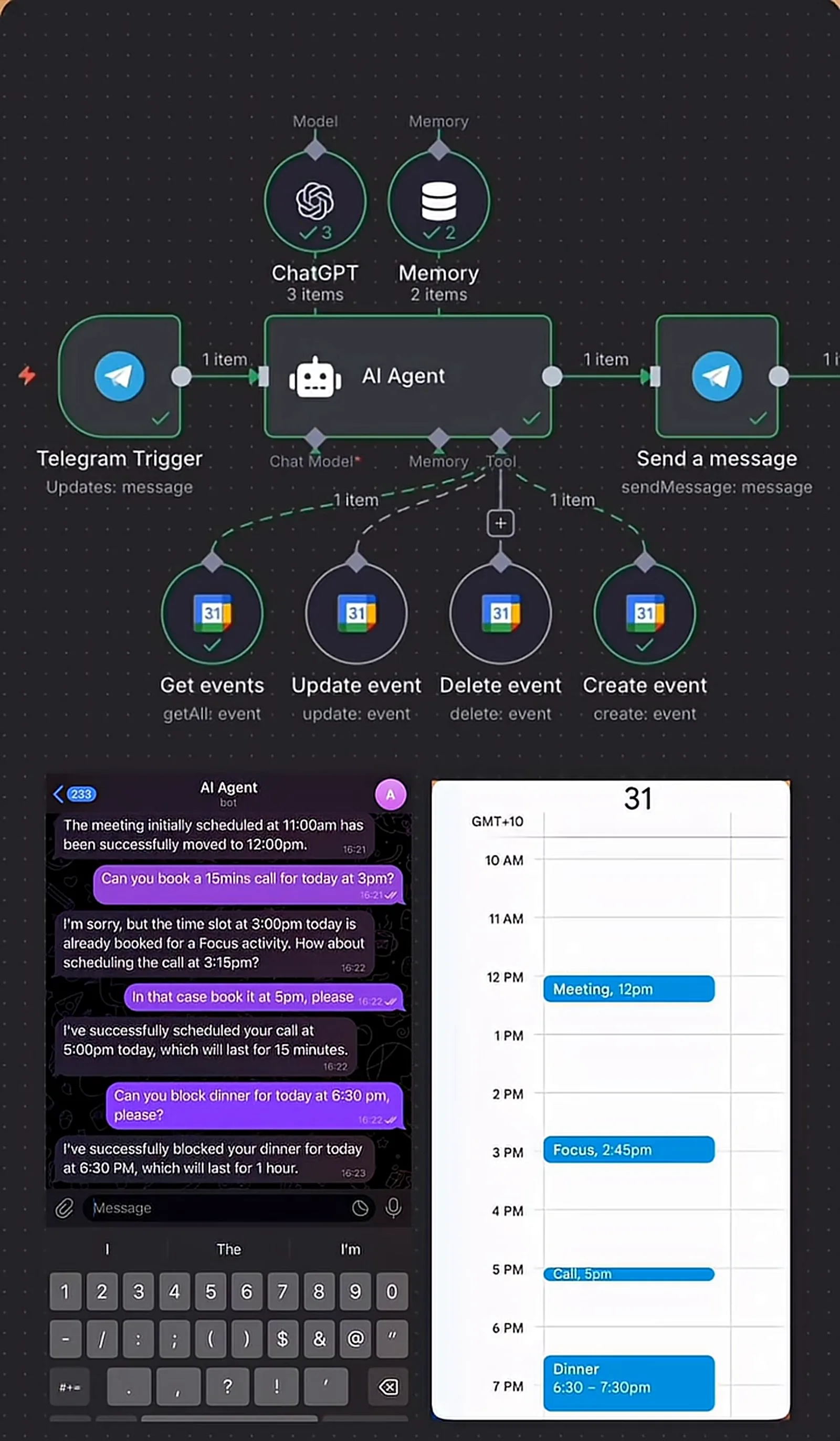
An n8n AI agent that runs a Google Calendar from Telegram messages. Ask what is on today, move a meeting, book a call or block time for dinner in plain language, and the agent uses four Google Calendar tools to read, create, update and delete events. Before booking it checks for clashes, and when a slot is taken it suggests another time instead of double-booking. Every change is confirmed in the chat and shows up in Google Calendar straight away, so the calendar app never needs to be opened.
Project description
Managing a calendar on a phone is a string of small chores: open the app, find the day, tap the event, pick a new time, check nothing clashes. This n8n workflow replaces all of that with a chat. A Telegram message such as "move the meeting to 12" or "book a 15 minute call at 3pm" goes to an AI agent that reads and changes Google Calendar for you, checks for clashes, and confirms what it did.
Tools & Deliverables
- Telegram trigger on a private bot, with replies sent back to the same chat
- AI agent on an OpenAI chat model with memory, so "move it to 12" refers to the right meeting
- Four Google Calendar tools: get events, create event, update event, delete event
- Clash check before every booking, with an alternative time offered when the slot is taken
- Plain-language confirmations that state the new time and duration
- Every change written to Google Calendar immediately
The problem
- Calendar apps are slow on a phone. Moving one meeting takes several taps, screens and a time picker.
- Double-booking happens in a hurry. Adding an event quickly without looking at the day is how clashes get made.
- Small blocks get skipped. Dinner, focus time and short calls rarely make it into the calendar because it is not worth opening the app.
- Context gets lost. "Move the meeting" only works if something knows which meeting you mean.
Approach
The workflow is deliberately small: a Telegram trigger, one AI agent and a reply node. The intelligence sits in the agent and its tools. The agent runs on an OpenAI chat model with memory, and it has four Google Calendar tools: get events, create event, update event and delete event. When a message arrives, the agent decides which tools to call and in what order.
That order matters. For a booking request the agent first reads the day's events and checks the requested time against them. If the slot is free it creates the event. If it is not, it says what is already there and proposes the next free time, and books only when the user agrees. Memory carries the conversation, so after it lists the day, "move the meeting to 12" is understood as the 11am meeting it just mentioned.
Solution
In the demo, the assistant lists the day's two events, moves the 11am meeting to 12pm, notices that 3pm is already taken by a focus block and suggests 3:15pm instead, books a 15-minute call at 5pm when asked, and blocks an hour for dinner at 6:30pm. Each change appears in Google Calendar as it happens, and the calendar app is never opened.
The pattern extends easily. Shared team calendars, video meeting links, reminders before each event or a morning summary of the day ahead are each one more tool or trigger. It can run on WhatsApp or Slack instead of Telegram, and rules such as working hours or buffer time between meetings can be written into the agent's instructions.
FAQ
Will it double-book me?
It reads the day's events before booking. When a slot is taken it says so and suggests a free time instead.
Which calendar does it work with?
Google Calendar in this build. Outlook calendars work through the Microsoft Outlook nodes in n8n.
Can it handle more than one calendar?
Yes. Each calendar can be added as its own tool, for example work and personal.
Can I use it from WhatsApp or Slack instead?
Yes. Only the trigger and reply nodes change. The agent and calendar tools stay the same.
Can other people use my bot?
It can be locked to your own Telegram account, so only you can change your calendar.