In short
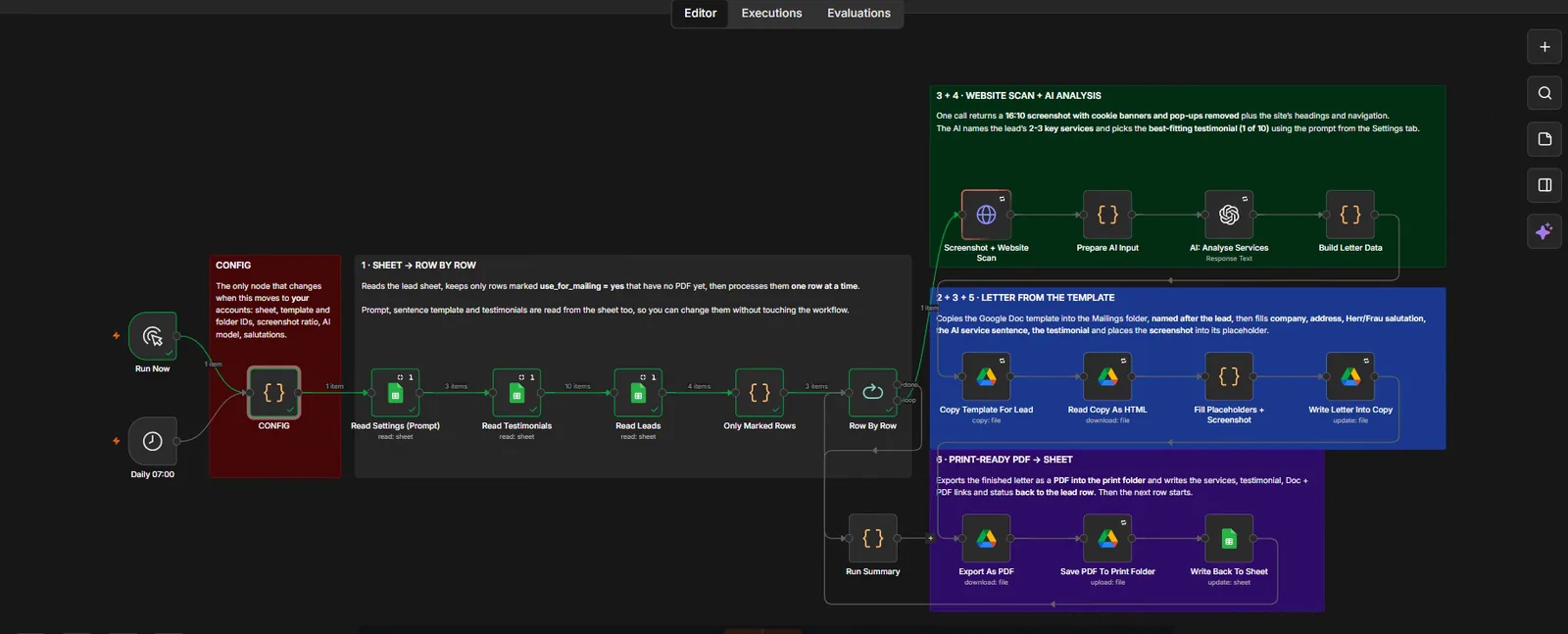
n8n automation that turns one row in a Google Sheet into a print-ready, personalised sales letter. For each lead marked in the sheet it screenshots their website with cookie banners removed, uses AI to name their 2 to 3 key services and pick the best fitting testimonial out of 10, fills a Google Docs template with the company, address and Herr or Frau salutation, exports a PDF to the print folder, and writes the links and status back to the row. It runs unattended at 07:00, and one CONFIG node moves the whole build to your own Google and OpenAI accounts.
Project description
One row in a Google Sheet becomes a print-ready, personalised letter. For every lead marked for mailing, the workflow screenshots the company's own website, uses AI to name their key services and choose the best fitting testimonial, fills a Google Docs template with the right address and salutation, exports a PDF to the print folder, and writes the links and status back to the sheet. It runs row by row, unattended, every morning at 07:00.
Tools & Deliverables
- n8n workflow with a manual Run Now trigger and a daily 07:00 schedule, built on native Google Sheets, Docs and Drive nodes
- Website screenshot at 16:10 with cookie banners and pop-ups removed, plus the site's headings and navigation captured for the AI step
- One AI call per lead that names 2 to 3 key services and selects the best fitting testimonial from a library of 10
- Google Docs letter generation with company, address, Herr or Frau salutation, AI service sentence, testimonial and the screenshot placed into the layout
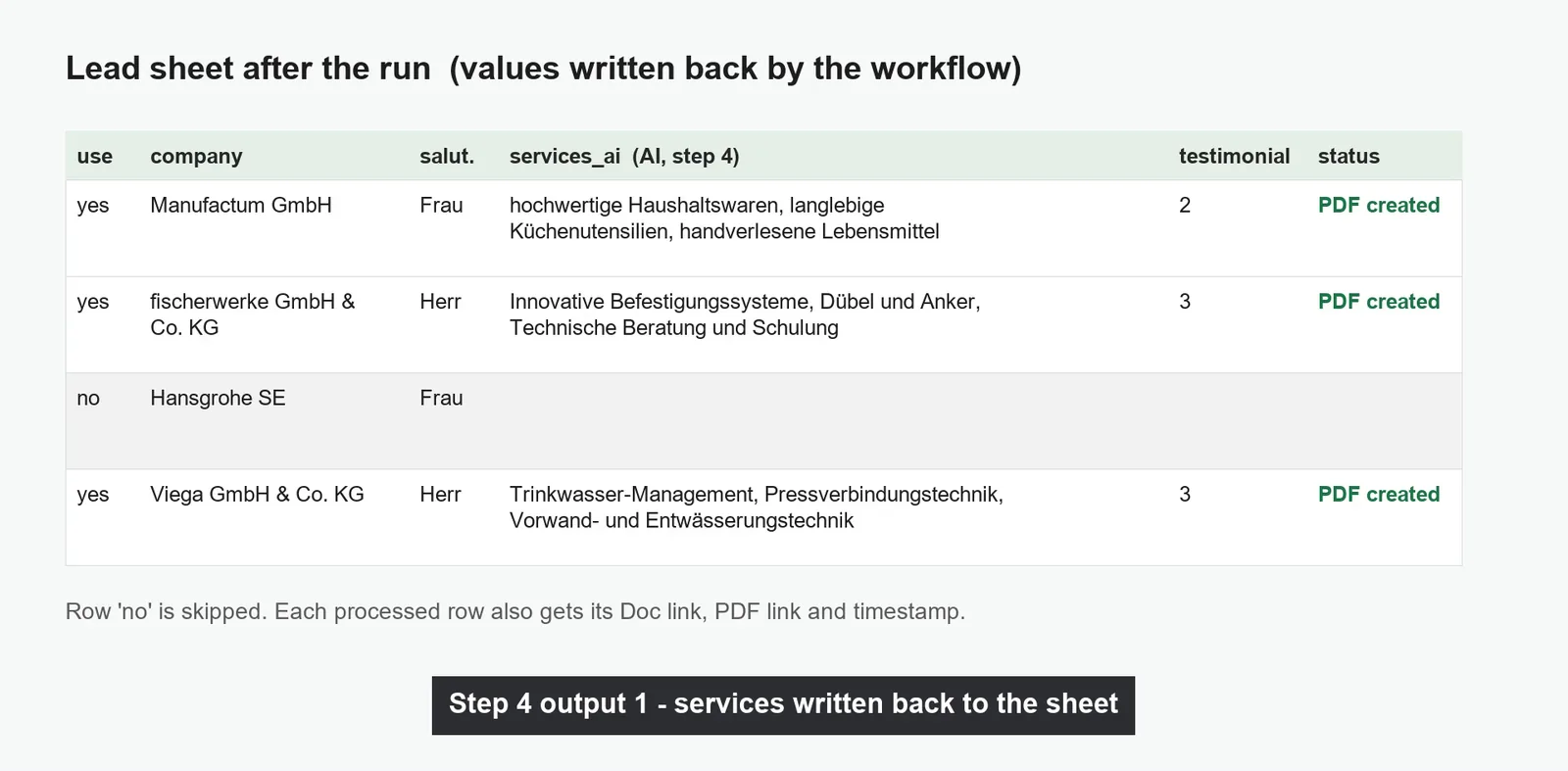
- Print-ready PDF exported to a Drive print folder, with services, testimonial, Doc link, PDF link and status written back to the lead row
- A single CONFIG node holding sheet, template and folder IDs, screenshot ratio, AI model and salutations, so the whole build moves to the client's accounts in one place
The problem
- Personalised direct mail does not scale by hand. Researching a company's website, writing an opening that proves you looked, choosing a relevant testimonial, formatting the letter and exporting a PDF takes 15 to 20 minutes per lead. Twenty letters is a day gone.
- Mail merge is not personalisation. Swapping a company name into a template is obvious to the person reading it. What earns a reply is a first paragraph about their actual business, and that is exactly the part a mail merge cannot do.
- The work is spread across four tools. The lead list lives in Sheets, the letter layout in Docs, the finished PDFs in Drive, and the judgement about which testimonial fits lives in someone's head.
- Half-done runs are worse than no runs. Without a record of which rows already produced a PDF, a second run duplicates letters, and duplicates in direct mail cost real postage.
- It has to survive handover. A build tied to the developer's Google account and API keys is worthless the moment the contract ends.
Approach
The sheet is the control surface, not the workflow. The lead tab carries a use_for_mailing column, and the workflow only picks up rows marked yes that do not already have a PDF, which makes a second run safe: it resumes rather than repeats. A settings tab holds the AI prompt and the salutation rules, and a testimonials tab holds the library of 10. That means the client can reword how the AI writes, swap testimonials, or change who gets a letter without ever opening n8n. Leads are processed one row at a time rather than in a batch, so a failure affects a single letter, costs are predictable, and the run can be stopped and resumed at any point.
The personalisation is the part worth automating carefully. For each lead, one call returns a 16:10 screenshot of their website with cookie banners and pop-ups removed, along with the site's headings and navigation. That text goes to the AI step, which names the company's 2 to 3 key services and picks the testimonial that best matches, using the prompt stored in the sheet. From there the workflow copies the Google Docs template into the mailings folder, names the copy after the lead, and fills in the company, the postal address, the correct Herr or Frau salutation, the AI service sentence, the chosen testimonial and the screenshot itself, placed into the layout rather than pasted on top. The letter is then exported as a PDF into the print folder, and the services, testimonial, Doc link, PDF link and status are written back to the lead row before the next row begins.
Solution
In the recorded run, four demo leads sat in the sheet with three marked for mailing. The workflow produced three finished German letters, every node green, with no manual step between the sheet row and the print-ready PDF. Each letter opens with a line about that company's own website, shows a screenshot of their site inside the layout, carries a testimonial chosen to match their sector, and is addressed with the correct salutation and postal address. The fourth row was left alone, exactly as marked. The companies shown in the letters are real public websites, used only to demonstrate the screenshot and analysis step. Every contact name, address and testimonial in them is placeholder data.
The build was made to hand over. Every Google and AI credential is the client's own, and a single CONFIG node holds the sheet ID, template ID, folder IDs, screenshot ratio, AI model and salutation strings, so moving the workflow to another account is one node to edit rather than a hunt through twenty. Native Google Sheets, Docs and Drive nodes are used throughout rather than raw HTTP calls, which keeps authentication inside n8n's own credential store and avoids the service-account setup that usually breaks these builds a month later. The daily 07:00 trigger means the letters for the day are waiting before anyone sits down.
FAQ
How is this different from a mail merge?
A mail merge inserts a company name into a fixed sentence. This reads the lead's actual website, names the services they actually sell, puts a screenshot of their own site in the letter, and picks the testimonial closest to their sector. The first paragraph is the part that earns a reply, and it is different for every recipient.
What can be changed without touching n8n?
The AI prompt, the sentence template, the 10 testimonials, the salutations, which rows get mailed, and the folder and template IDs. All of it lives in the Google Sheet and the Docs template.
Will it send duplicates if it runs twice?
No. It only picks up rows marked for mailing that have no PDF yet, and it writes the Doc link, PDF link and status back to the row as soon as a letter is finished.
Whose accounts does it run on?
The client's. Google Sheets, Docs and Drive run on their Workspace through n8n's credential store, and the AI calls run on their own API key. Nothing is tied to me after handover.
What does it cost to run?
One screenshot and one AI call per lead. The Google steps are inside normal Workspace usage, so the running cost scales with how many letters are actually produced, not with how long the workflow is switched on.