In short
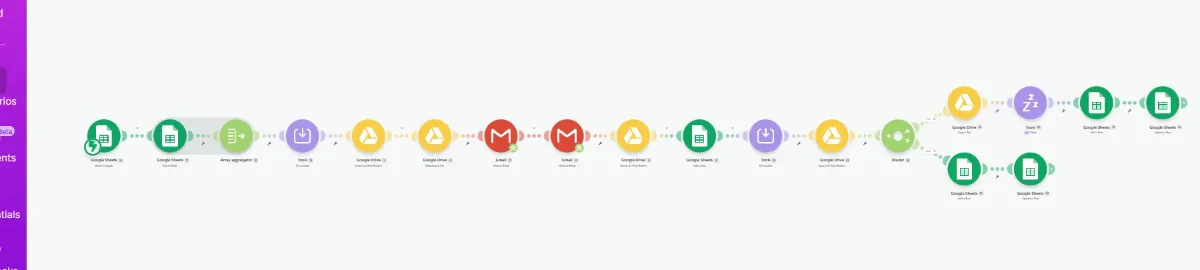
Three Make.com scenarios for a real estate company, live and in daily use. Staff enter buyer and seller details in a Google Sheet and mark the row Ready. Make finds the listing file in Google Drive, emails the buyer and the seller with it attached, copies the office so every send is confirmed, and logs the time to a master sheet. From that log, buyers are followed up every three days and sellers reminded every seven. Close to five hours of daily follow-up work now takes minutes, and no buyer is missed.
Project description
A real estate company was running buyer and seller communication from spreadsheets and memory. For every match, someone copied the buyer's details, went into Google Drive to find the listing file, attached it, emailed the buyer and the seller, and then had to remember to follow up days later. Some buyers were never followed up at all. I built three Make.com scenarios that now run that process every day, and the team's only job is entering the details.
Tools & Deliverables
- Main scenario triggered when a row is marked Ready, sending the listing email to both buyer and seller
- Google Drive lookup using the listing ID, so the correct listing file is attached automatically
- Office copied on every email, so the company can confirm each send went out correctly
- Master sheet logging the time of every send, which drives all the follow-up timing
- 3-Day Follow Up scenario that follows up every buyer who is due
- 7-Day Follow Up scenario that reminds sellers about the buyers they need to follow up on
The problem
- Every match meant manual assembly. Copying buyer details, finding the listing file in Google Drive, attaching it and writing two emails took time on every single listing.
- Follow-ups depended on memory. Buyers due for a follow-up were found by scanning spreadsheets, and some simply slipped through.
- Follow-up capacity was capped. The team could follow up five to ten buyers in close to an hour, which limited how many deals stayed warm.
- Sellers were left out of the loop. Sellers needed reminding about buyers they had to follow up on, and nothing prompted that.
- The whole process cost close to five hours a day. Hours spent copying, attaching and chasing instead of selling.
Approach
The spreadsheet stayed, because it was where the team already worked. They enter the buyer and seller details on a row and change its status to Ready, and that status change is what triggers the main scenario. Make reads the row, takes the listing ID, searches Google Drive for that listing's file and downloads it, then sends the email meant for the buyer and the email meant for the seller, each with the listing attached. Every email copies the office, so the company has its own confirmation that each one went out.
Once the emails are sent, the scenario writes the time of each send into a master sheet. That log is the backbone of the system, because the two follow-up scenarios work from it. The 3-Day Follow Up runs on a schedule and follows up every buyer who is due, three days after their last email. The 7-Day Follow Up does the same for sellers on a seven day cycle, reminding them about the buyers they need to follow up on. Nobody has to remember anything, because the dates are in the log and the scenarios read them.
Solution
The system is live and the company uses it every day. What used to take close to five hours a day of copying, attaching and chasing now takes minutes: enter the details, mark the row Ready, and the emails, attachments, confirmations and follow-ups happen on their own. Follow-up capacity went from five to ten buyers in close to an hour to fifteen and more in less time, and buyers due for a follow-up no longer fall through.
The design keeps the team in control of what matters. They still decide which buyer matches which listing and when a row is ready, and the master sheet shows exactly what was sent to whom and when. Because the timing lives in the log rather than in anyone's calendar, the follow-up cadence can be changed by editing a filter, and the same structure extends to new steps such as showing reminders or offer deadlines.
FAQ
Did the team have to change how they work?
Very little. They kept their spreadsheet. The only new step is setting a row's status to Ready.
How does it attach the right listing?
Each row carries a listing ID. Make uses it to search Google Drive for that listing's file and attaches it to both emails.
How do you know every email actually went out?
The office is copied on every send, and each send is logged with a time in the master sheet.
Can the follow-up timing change?
Yes. The three and seven day cycles are filters on the log, so changing them is a small edit rather than a rebuild.
Could this run on a CRM instead of spreadsheets?
Yes. The same logic works with GoHighLevel, Follow Up Boss, HubSpot or Podio, with the CRM holding the records the sheet holds today.